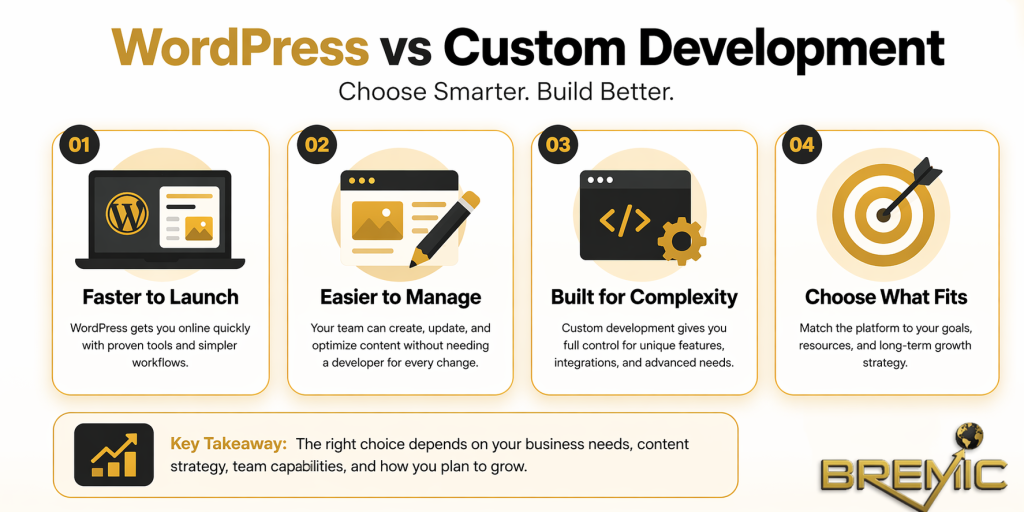
Choosing between WordPress vs custom development is not just a technical decision. It affects how quickly you can launch, how easily your team can manage the site, how flexible the platform will be over time, and how efficiently you can support SEO, performance, and growth.
Many businesses frame this choice too simply. WordPress is often treated as the “cheap” option, while custom development is positioned as the “serious” one. In practice, that is not how strong website strategy works. The right answer depends on your business model, content needs, operational complexity, internal resources, and long-term priorities.
For SEO, this decision matters because your website platform shapes technical performance, publishing workflows, scalability, structured data implementation, content architecture, and how easily you can maintain the site over time. A platform that looks impressive in a proposal can still become a constraint if it slows down content production or makes routine changes too dependent on developers.
This article explains the real difference between WordPress vs custom development, how each approach works, where each one fits, and what businesses often get wrong when evaluating them.
What Is Web Development?
Web Development is the process of building, maintaining, and improving websites or web-based platforms. In practical terms, it includes everything from front-end design and user experience to back-end systems, CMS functionality, integrations, security, performance, and ongoing maintenance.
From a business perspective, web development is not only about creating pages that look good. It is about building a system that supports real outcomes: publishing content efficiently, generating leads, improving visibility in search, integrating with tools, and adapting as the business changes.
The WordPress vs custom development question sits inside that broader web development strategy.
WordPress in practical terms
WordPress is a content management system that allows businesses to publish and manage website content without building everything from scratch. It comes with an admin interface, theme system, plugin ecosystem, and standard publishing workflows.
For many marketing-led sites, this is a major advantage. Your team can create pages, edit content, publish articles, update metadata, and manage media without needing a developer for every change.
Custom development in practical terms
Custom development means the website is built specifically for the business, usually with a bespoke front end, back end, or both. This may involve a custom CMS, a headless architecture, or a framework-based build tailored to unique requirements.
The core advantage is control. Instead of working within an existing CMS model, the system is designed around your exact workflows, data structures, integrations, and user needs.
Why It Matters
The choice between WordPress vs custom development has direct implications for SEO and website performance.
Search performance depends on much more than content alone. Your platform affects:
- page speed and technical efficiency
- URL structure and internal linking flexibility
- metadata and schema implementation
- content publishing speed
- crawlability and indexation
- site governance and maintenance
A business that publishes content regularly often benefits from a platform that supports efficient editorial operations. A business with complex functionality may need deeper control than WordPress can comfortably provide. In both cases, the wrong choice creates friction.
SEO is partly a systems problem
Many SEO issues are not caused by strategy gaps. They come from platform limitations. If your CMS makes templates rigid, blocks scalable optimization, or turns simple updates into development tickets, execution slows down. That affects rankings over time because the site becomes harder to improve.
Platform choice affects long-term authority
Topical authority is built through consistent publishing, strong internal linking, clean site architecture, and the ability to expand content clusters logically. If your platform makes those tasks easy, SEO becomes more sustainable. If it makes them hard, even a strong strategy will underperform.
How WordPress and Custom Development Work in Practice
The real comparison in WordPress vs custom development is not “easy versus advanced.” It is closer to standardized efficiency versus tailored flexibility.
When WordPress is the better fit
WordPress works well when the website is primarily content-driven and the business needs speed, usability, and manageable costs.
This often includes:
- company websites
- blogs and resource hubs
- service-based business sites
- lead generation websites
- small to mid-sized content platforms
- websites with standard CMS needs
For SEO teams, WordPress is often practical because it supports established publishing workflows. You can usually implement SEO basics efficiently, including title tags, meta descriptions, canonicals, XML sitemaps, structured content templates, and internal linking structures.
Where WordPress creates value
The biggest strength of WordPress is leverage. You are not reinventing standard website functions. That reduces time to launch and makes content operations easier for non-technical teams.
It also tends to lower dependency on developers for routine work. That matters more than many businesses realize. A website that marketers can actually use often performs better over time than a highly custom system that becomes operationally slow.
Where WordPress becomes limiting
WordPress can become a poor fit when the site requires highly specific functionality, unusual data models, advanced application logic, or tightly controlled performance at scale.
It can also become messy when too many plugins are used to solve structural problems. In those cases, WordPress may still work, but the architecture often becomes harder to maintain, secure, and optimize.
When custom development is the better fit
Custom development is usually the stronger option when the website is not just a publishing platform but a core product, service layer, or operational system.
That can include:
- complex web applications
- advanced user portals
- businesses with custom workflows or permissions
- websites with unusual content relationships
- platforms with heavy API or third-party integration requirements
- organizations with strong in-house technical capacity
Where custom development creates value
A custom build allows the platform to match the business, rather than forcing the business to adapt to the platform.
That can improve SEO indirectly by giving you cleaner architecture, leaner code, stronger performance control, and better handling of complex page types or dynamically generated content. It can also support a better user experience, which affects engagement, conversion, and site quality overall.
Where custom development becomes a risk
Custom development is often oversold without enough attention to maintenance. A bespoke platform is only an advantage if the business can support it properly.
Without strong planning, documentation, governance, and ongoing development capacity, a custom site can become expensive to update and difficult to scale. Even basic SEO requests may take longer because nothing is standardized.
Important Subtopics to Consider
Content operations and publishing workflow
This is one of the most overlooked parts of the WordPress vs custom development decision.
If your growth model relies on publishing landing pages, articles, guides, case studies, and cluster content, content operations matter. A platform that makes publishing slow will eventually limit SEO output.
WordPress usually performs well here because the editorial model already exists. In custom development, content workflows need to be intentionally designed. If they are not, the team may end up relying on developers for routine publishing tasks.
Technical SEO flexibility
Both approaches can support strong SEO. The difference is how easily and reliably that happens.
WordPress can handle technical SEO very well when the site is properly built, lightweight, and maintained with discipline. Custom development can offer even more control, but only if SEO requirements are included from the start.
A common mistake is assuming custom means SEO-friendly by default. It does not. Custom only gives you the ability to build what you need. It does not guarantee that the right SEO elements will be implemented correctly.
Performance and maintainability
Performance is often used as an argument against WordPress, but that argument is usually too broad.
A well-built WordPress site can perform very well. A badly built custom site can perform poorly. The decisive factor is implementation quality, not just platform category.
That said, custom development can provide an advantage when performance requirements are highly specific and the team wants tight control over what is loaded, rendered, and managed across the stack.
Common Mistakes
Treating WordPress as inherently low quality
This is one of the least useful assumptions in web strategy. WordPress powers many serious, high-performing websites because it solves a real business problem: efficient content management.
The problem is not WordPress itself. The problem is poor implementation, excessive plugin reliance, weak governance, and lack of technical discipline.
Choosing custom development for status reasons
Some businesses choose custom development because it feels more advanced or more impressive. That is rarely a sound reason.
If the site’s core needs are mostly standard, custom development can add cost and complexity without creating proportional business value.
Ignoring internal team capability
A platform is only as effective as the team managing it. If your marketing team needs autonomy, and your developers are limited, a highly custom system may create bottlenecks. If your business has sophisticated engineering resources and complex technical needs, a standard CMS may be too restrictive.
Evaluating only launch cost
The right comparison is not just build cost. It is total operational cost over time.
That includes:
- content updates
- SEO implementation
- bug fixes
- security and maintenance
- feature expansion
- platform governance
A cheaper launch can become expensive later. A more expensive build can also become inefficient if the business does not fully use its capabilities.
Practical Guidance
When deciding between WordPress vs custom development, start with business requirements rather than technical preference.
Ask questions such as:
What is the website actually supposed to do?
Is it primarily a content and lead generation platform, or is it a custom digital product with specialized workflows?
How important is publishing speed?
If SEO and content marketing are central growth channels, the CMS experience matters a great deal.
How complex is the functionality?
Standard page templates, service pages, blog content, and lead capture do not usually require custom development. Advanced application logic may.
Who will maintain the site?
A system that depends on specialist developers for every meaningful update creates long-term friction unless that support model already exists.
How much flexibility will you need in two years?
The best decision is not just about current requirements. It should account for how the website, content model, and business operations are likely to evolve.
Timing and Expectations
This decision does not produce SEO results on its own. A better platform creates better conditions for execution, but rankings still depend on content quality, search intent alignment, authority, internal linking, technical quality, and consistent optimization.
In practical terms, platform improvements may support better outcomes over several months, especially when they improve crawlability, performance, or publishing efficiency. But no CMS or custom build will replace a strong SEO strategy.
The realistic goal is not to find a “perfect” platform. It is to choose one that supports sustainable execution without creating unnecessary operational drag.
Conclusion
The right answer to WordPress vs custom development depends on what your business needs the website to become.
If your site is content-led, marketing-driven, and needs efficient day-to-day management, WordPress is often the stronger strategic choice. If your website requires advanced functionality, highly specific workflows, or deeper architectural control, custom development may be the better long-term investment.
The key is to make the decision based on operational reality, not assumptions. Strong web development supports SEO best when the platform fits the business, the content model, and the team responsible for growth. That is what turns a website into a durable asset rather than just a launch project.