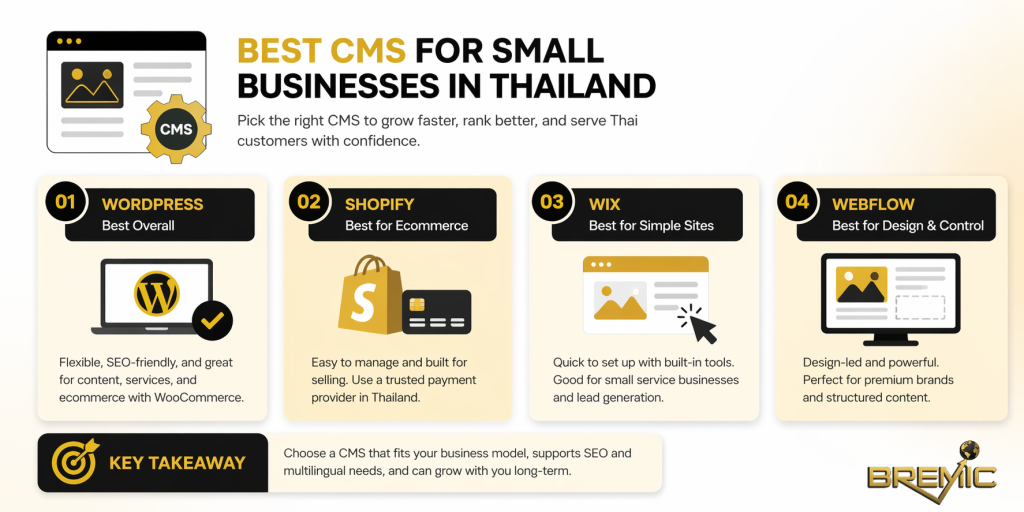
Choosing the best CMS for small businesses in Thailand is not really about finding one platform that is “best” in the abstract. It is about choosing the system that fits your business model, your in-house capability, your SEO goals, and the realities of running a site for Thai customers.
That matters because CMS decisions are expensive to reverse. A poor choice can slow down publishing, limit multilingual SEO, complicate payments, and create unnecessary redevelopment costs later. A good choice makes content, Web Development, SEO, and day-to-day operations easier to manage together.
For most small businesses in Thailand, the right answer is usually one of four options: WordPress, Shopify, Wix, or Webflow. The right platform depends on whether you are running a service business, a content-led business, or an ecommerce operation with local payment requirements. WordPress remains the strongest all-round option because it is open source, highly customizable, and relatively lightweight in its core requirements, while WooCommerce is translation-ready for multilingual stores.
What Is Web Development?
In this context, Web Development is the practical process of building and maintaining the structure, functionality, performance, and content system behind your website.
A CMS is one part of that larger process. It controls how pages are created, edited, published, and updated. Your CMS choice affects your site architecture, URL control, localization setup, SEO workflows, plugin or app dependencies, and how easily your team can scale content over time.
That is why CMS selection is not just a design decision. It is a structural business decision. If your CMS makes it hard to manage Thai and English content, customize metadata, or integrate local payment options, that will eventually affect organic performance and conversion efficiency.
Why It Matters for SEO
From an SEO perspective, a CMS should help you do three things well.
First, it should let you publish and update content efficiently. A business that cannot maintain service pages, landing pages, blog content, and conversion pages consistently will struggle to build topical authority.
Second, it should support clean technical execution. That includes sensible URL structures, editable metadata, multilingual management, internal linking, image optimization, and performance control.
Third, it should fit your actual operating model. A CMS that is theoretically powerful but too complex for your team often performs worse than a simpler system that gets used properly.
For Thailand-based small businesses, there is an extra layer: the CMS also needs to fit local commercial requirements. If you sell online, payment gateway availability matters. If you serve both Thai and English audiences, multilingual SEO matters. If you depend on an agency, platform ownership and development flexibility matter.
How to Choose the Best CMS for Small Businesses in Thailand
The practical way to choose is to start with the business model, not the platform.
Ask these questions first:
- Is the site mainly for lead generation, content, or ecommerce?
- Will you need Thai and English versions of key pages?
- Do you need local payment methods or only basic enquiry forms?
- Will the site be managed in-house or by a developer or agency?
- Is SEO a primary acquisition channel or a secondary one?
Once those answers are clear, the CMS choice becomes easier.
Best Overall: WordPress for Most Small Businesses
For most Thai small businesses, WordPress is the best default CMS.
The reason is not hype. It is structural flexibility. WordPress is open source, works for non-technical users at a basic level, and allows far deeper customization when you need it. Its official requirements are also relatively straightforward: PHP, MySQL or MariaDB, and HTTPS on standard web servers such as Apache or Nginx.
That makes WordPress a strong fit for:
- service businesses that need local SEO and lead generation
- companies building content clusters and pillar pages
- businesses that may add ecommerce later
- brands that want long-term control over SEO and site architecture
When ecommerce is involved, WordPress plus WooCommerce becomes especially compelling in Thailand because WooCommerce is translation-ready, and local providers such as LianLian offer WooCommerce plugins that support methods such as PromptPay, mobile banking, TrueMoney, LINE Pay, and ShopeePay.
The trade-off is responsibility. WordPress gives you control, but it also gives you ownership of hosting, updates, plugin governance, and security hygiene. That is not a weakness if you have a capable partner or a sensible maintenance process. It becomes a weakness only when businesses want enterprise flexibility with no operational discipline.
Best for Simpler Ecommerce: Shopify
If your business is primarily ecommerce and you want a faster operational setup with less technical overhead, Shopify is the strongest managed option.
Its main advantage is simplicity. You are not building your own stack. You are operating within a hosted commerce platform with a mature admin experience, strong app ecosystem, and multilingual support. Shopify also supports separate URLs for translated content, and most plans allow selling in up to 20 languages from a single store.
That makes Shopify a good fit for:
- product-first businesses
- teams with limited technical capacity
- founders who want lower maintenance overhead
- brands prioritizing operational speed over deep customization
But there is an important Thailand-specific caveat. As of April 16, 2026, Thailand does not appear in Shopify Payments’ supported country list, which means Thailand-based merchants generally need a third-party payment provider instead of Shopify Payments. Shopify’s own documentation says businesses in unsupported countries must use third-party providers, and local providers such as LianLian and Opn document Shopify integrations for Thailand.
That does not make Shopify a bad choice in Thailand. It just means you should not evaluate it as if you were operating in the US or UK. For Thai ecommerce, payments need to be part of the CMS decision from day one.
Best for Very Small Service Sites: Wix
For small service businesses that need a straightforward website and do not want much technical complexity, Wix can work well.
Its main strengths are speed of setup, ease of editing, and built-in business tools. Wix also supports multilingual websites and lets you tailor SEO settings for each language. By default, it adds hreflang and x-default tags for multilingual pages, which is helpful for international or bilingual targeting.
However, Wix is not the best long-term fit for every SEO-driven business. One important limitation is that, in its multilingual setup, it does not currently allow you to customize the page URL separately for each language version. That is a meaningful consideration if localized URL control is important to your SEO strategy.
Wix also has Thailand-specific payment considerations. Its support documentation lists Thailand payment provider availability through partners such as PayPal, Rapyd, Atome, Paymentwall, and Stripe. At the same time, Wix states that Opn Payments will discontinue operations for existing Wix users from May 19, 2026, which is exactly the kind of platform-specific change that small businesses often overlook until it becomes an operational problem.
So Wix is reasonable for brochure-style or lead-generation sites, but less attractive for businesses that want deeper multilingual SEO control or more locally tailored ecommerce flexibility.
Best for Design-Led Service Brands: Webflow
Webflow is often the best choice when design quality, structured content, and agency-friendly workflows matter more than plugin-heavy flexibility.
Its CMS is strong for visual content management, structured collections, and marketer-friendly updates, while still giving developers API-level options and deeper implementation control. Webflow also supports localized SEO fields and even localized slugs for pages.
That makes it a strong option for:
- premium service businesses
- B2B sites
- firms working with a designer or web partner
- brands that care heavily about presentation and structured content
But there is a major limitation to understand before choosing it for ecommerce in Thailand: Webflow’s help center states that Localization is not compatible with Webflow Ecommerce, and its localization feature is still marked beta.
So Webflow is often excellent for a bilingual service brand or content-led company, but it is not the most practical answer for a Thai small business that wants localized ecommerce without extra complexity.
Important Subtopics That Should Influence the Decision
Multilingual SEO
In Thailand, many businesses eventually need at least some bilingual content. Even if the full site is not translated, core pages often need Thai and English versions.
That means the CMS should be judged on more than translation availability. You should also look at:
- URL handling per language
- metadata control by locale
- internal linking between language versions
- how easy it is to manage content updates consistently
This is one reason WordPress, Shopify, and Webflow are often stronger long-term choices than simpler site builders for serious SEO work. Their localization options are generally more strategic, or at least more scalable, than the entry-level alternatives.
Payment Integration in Thailand
A lot of CMS comparison content ignores local payments, but that is a mistake in this market.
If ecommerce matters, assess the platform based on whether it can realistically support the payment providers and checkout experience your customers expect. A platform that looks cheaper at the start can become more expensive if payment workarounds, app dependencies, or replatforming are needed later.
Ownership and Scalability
A business site is rarely static for long. Today it may be five pages. Next year it may need blog content, landing pages, multilingual SEO, appointment booking, ecommerce, or integrations with CRM and analytics tools.
That is why future flexibility matters. WordPress usually wins on ownership and extensibility. Shopify wins on operational simplicity. Webflow wins on design control. Wix wins on ease of use, but usually loses earlier when requirements become more advanced.
Common Mistakes
One common mistake is choosing a CMS based only on design templates. Templates matter, but they are rarely the long-term constraint.
Another is treating all small businesses as if they need the same platform. A local dental clinic, a niche ecommerce brand, and a consulting firm should not automatically use the same CMS.
A third mistake is ignoring Thailand-specific checkout and localization realities. A global recommendation article might say Shopify or Wix is the easiest answer, but that advice becomes weaker if local payments, Thai language handling, or bilingual SEO are central to your business.
The last major mistake is underestimating maintenance. The best CMS is not the one with the longest feature list. It is the one your business can operate properly for the next two to three years.
Practical Guidance
If you want a realistic decision framework, use this:
Choose WordPress if SEO, content growth, flexibility, and long-term ownership are priorities.
Choose Shopify if ecommerce is the core business and you want a cleaner operating model, but validate Thailand payment integrations first.
Choose Wix if the site is simple, speed matters, and advanced multilingual SEO is not a major requirement.
Choose Webflow if you want a polished, structured, design-led site and have the budget or support to manage it properly.
For most businesses, I would not start by asking which CMS is the most popular. I would start by asking which one makes it easiest to publish, localize, optimize, and grow without rebuilding the site in 12 months.
Timing and Expectations
Changing CMS does not create rankings on its own.
A better CMS gives you a better operating environment. The SEO gains come from what you do with it: stronger site architecture, better internal linking, cleaner technical execution, more useful content, and more consistent publishing.
In practice, a good CMS decision can improve workflow immediately, but meaningful SEO results still depend on execution over time. If your business is building topical authority, think in quarters, not weeks.
Conclusion
The best CMS for small businesses in Thailand is usually the one that fits both your current needs and your next stage of growth.
For most businesses, WordPress is the strongest overall recommendation because it gives you control over SEO, content structure, and future development without locking you into a rigid platform. Shopify is the best managed option for ecommerce, provided you plan around Thailand’s third-party payment reality. Wix and Webflow both have valid roles, but they are more situational choices rather than universal defaults.
The strategic takeaway is simple: do not choose a CMS as a design tool alone. Choose it as the operational foundation for SEO, content, conversion, and long-term business growth.